





DriveX City
























About game «DriveX City»
DriveX City – 3D Open World Driving Game Online
Welcome to DriveX City, an exciting 3D driving game that puts you behind the wheel in a massive open-world environment filled with fast cars, challenging roads, dynamic gameplay, and countless opportunities to explore.
Get ready to experience a driving adventure where you can explore a huge 3D city, test your driving skills, accelerate through open roads, perform jumps, use nitro boosts, and take on a wide variety of game modes.
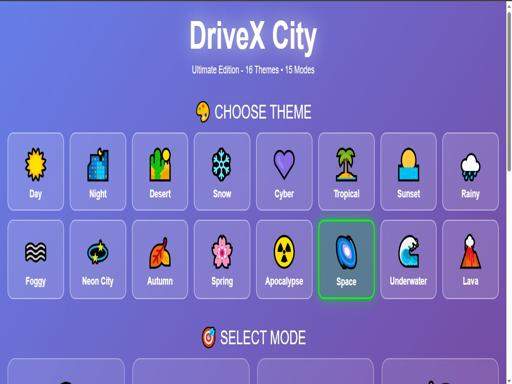
With 16 unique themes and 15 exciting game modes, DriveX City offers a diverse driving experience for players who enjoy car games, open-world driving games, 3D racing games, city driving simulators, and browser-based driving adventures.
Whether you want to cruise around the city, push your vehicle to its limits, complete driving challenges, or simply explore the environment, DriveX City gives you plenty of ways to play.
The controls are easy to learn, making the game accessible on both desktop computers and compatible mobile devices.
Start your engine, choose your direction, hit the accelerator, activate Nitro when available, and discover everything DriveX City has to offer.
Are you ready to take control of the city?
What Is DriveX City?
DriveX City is a 3D driving adventure game featuring a large open-world environment, dynamic gameplay, multiple themes, and numerous game modes.
The game is designed for players who enjoy the freedom of driving through expansive environments rather than being limited to a single short race.
You can explore the city, drive through different areas, navigate roads, accelerate, brake, turn, jump, and use Nitro boosts when available.
The combination of open-world exploration and varied game modes gives DriveX City a broad appeal for fans of online car games.
Explore a Massive 3D Open World
One of the main attractions of DriveX City is its massive open-world driving environment.
Instead of simply following a predetermined racing track, you can explore a larger 3D world and discover different areas while driving.
The open environment creates opportunities to:
- Explore city roads.
- Practice driving.
- Discover different areas.
- Test vehicle movement.
- Perform jumps.
- Accelerate across open stretches.
- Experiment with different routes.
- Take on different game modes.
- Enjoy the 3D driving environment.
The open-world format gives you more freedom to decide how you want to experience the game.
16 Unique Themes
DriveX City features 16 unique themes, providing variety across the game’s visual environments.
Different themes can give the driving experience a fresh appearance and help prevent the game from feeling repetitive.
Whether you prefer exploring bright environments, dramatic city settings, or other visual styles, the multiple themes add variety to your driving adventure.
The themes also make repeated gameplay more visually interesting as you explore different environments and challenges.
15 Exciting Game Modes
DriveX City includes 15 game modes, giving players multiple ways to experience its driving mechanics.
Different modes can introduce new objectives, challenges, or ways to use the environment.
Instead of playing the same type of driving challenge repeatedly, you can explore different modes and find the gameplay style that suits you best.
For players who enjoy variety, the large number of game modes provides plenty of opportunities to experiment.
DriveX City Gameplay
The core gameplay focuses on controlling your vehicle through a 3D environment.
You can accelerate, brake, reverse, turn, jump, and use Nitro when available.
Your controls determine how your vehicle moves through the city.
Good driving requires understanding speed, direction, braking, and turning.
For more adventurous gameplay, you can also use the jump function to launch your vehicle over obstacles or terrain when the environment allows it.
How to Play DriveX City
DriveX City uses straightforward driving controls.
On desktop, use your keyboard to control the vehicle.
Desktop Controls
- W / Arrow Up – Accelerate and drive forward.
- S / Arrow Down – Brake or reverse.
- A / Arrow Left – Turn left.
- D / Arrow Right – Turn right.
- SHIFT – Activate Nitro Boost when available.
- SPACE – Jump.
- Double-click the title – Toggle sound ON/OFF.
These controls allow you to accelerate, slow down, steer, boost, and jump while exploring the 3D world.
W or Arrow Up – Accelerate
Press W or the Up Arrow to accelerate your vehicle and drive forward.
Use acceleration when you want to build speed, travel across the map, or take advantage of long open roads.
Managing your acceleration is important because driving at maximum speed is not always the best choice.
Sometimes you need to slow down before a turn or challenging section.
S or Arrow Down – Brake and Reverse
Press S or the Down Arrow to brake or reverse.
Braking helps you reduce speed when approaching turns, obstacles, or other areas where precise control is important.
The reverse function is useful if you become stuck or need to reposition your vehicle.
A or Arrow Left – Turn Left
Press A or the Left Arrow to steer left.
Use this control to navigate corners, city streets, obstacles, and different sections of the open world.
D or Arrow Right – Turn Right
Press D or the Right Arrow to steer right.
Combining acceleration and steering allows you to navigate the environment and maintain control of your vehicle.
SHIFT – Nitro Boost
Press SHIFT to activate Nitro Boost when available.
Nitro provides an additional burst of speed and can be useful when you want to accelerate rapidly.
Use Nitro strategically rather than activating it without considering your surroundings.
A boost can be especially useful on long straight sections where there is enough room to manage the increased speed.
SPACE – Jump
Press SPACE to make your vehicle jump when the feature is available.
Jumping adds another dimension to the driving experience and can be used to interact with ramps, terrain, obstacles, and other environmental features.
Experiment with jumps to discover what is possible within the game’s open world.
Sound Controls
DriveX City also provides a convenient sound toggle.
Double-click the title to turn sound ON or OFF.
This allows you to quickly adjust the audio experience while playing.
If you prefer to play quietly, turn the sound off.
If you enjoy the game’s audio effects, turn it back on.
DriveX City on Mobile
DriveX City is designed to provide an enjoyable experience on mobile and desktop devices.
On compatible mobile devices, the game uses touch-based controls to make driving accessible without a physical keyboard.
This makes it possible to enjoy the 3D driving experience in different settings.
Whether you are using a smartphone, tablet, laptop, or desktop computer, the goal remains the same: control your vehicle and explore the world.
DriveX City on Desktop
Desktop players can use the keyboard to control the vehicle.
The keyboard layout is simple:
W / Up = Forward
S / Down = Brake / Reverse
A / Left = Turn Left
D / Right = Turn Right
SHIFT = Nitro
SPACE = Jump
These controls provide quick access to the game’s major driving functions.
Open World Driving Experience
Open-world driving games are popular because they give players more freedom than traditional track-based racing games.
DriveX City uses this concept to create a larger environment where exploration is part of the experience.
You are not restricted to one narrow track.
Instead, you can navigate through the environment and discover different areas while testing your vehicle’s movement.
3D Driving Gameplay
The 3D environment gives DriveX City a more immersive presentation than a traditional two-dimensional car game.
The combination of three-dimensional roads, city environments, vehicle movement, and dynamic gameplay creates a driving experience that encourages exploration.
Players can focus on speed, navigation, challenges, or simply enjoying the environment.
Car Game for Racing Fans
DriveX City can appeal to players who enjoy racing and car games but also want something beyond conventional races.
The game’s multiple modes provide different challenges while the open-world environment gives players room to explore.
If you enjoy accelerating, steering, jumping, boosting, and navigating 3D environments, DriveX City offers a variety of ways to enjoy those mechanics.
Driving Simulator-Style Gameplay
DriveX City includes several elements associated with driving simulator-style games.
Players need to control acceleration, braking, steering, and vehicle positioning.
The open environment also gives you an opportunity to practice maneuvering and learn how the vehicle responds to different inputs.
While the game is designed primarily for entertainment, its driving controls encourage players to develop better control and timing.
Mastering the Controls
Learning the controls is the first step toward becoming a better DriveX City player.
Start by practicing basic movement.
Accelerate with W or the Up Arrow.
Use A and D to steer.
Use S or the Down Arrow to slow down or reverse.
Once you are comfortable with basic driving, experiment with Nitro and jumping.
Understanding how these features interact will help you navigate the environment more confidently.
DriveX City Driving Tips
Control Your Speed
Driving at maximum speed can be exciting, but it can also make steering more difficult.
Slow down when approaching sharp turns or areas that require precision.
Use Nitro Carefully
Nitro is most useful when you have enough open space to take advantage of the extra speed.
Avoid wasting a boost immediately before a tight turn.
Learn the Environment
Spend some time exploring the map.
Understanding the layout can help you identify useful routes and areas where you can safely accelerate or jump.
Practice Steering
Smooth steering can make a major difference.
Avoid making unnecessary sharp movements when traveling at high speed.
Experiment With Jumping
Use the Space key to explore the game’s jumping mechanics.
Ramps and suitable terrain can provide opportunities for more adventurous driving.
How to Drive Faster in DriveX City
To maintain high speed, combine acceleration with controlled steering.
Hold W or the Up Arrow on open roads and use Nitro when available.
However, speed alone does not guarantee good performance.
If you lose control, crash, or miss a turn, the time saved through acceleration may not be worthwhile.
The best approach is to combine speed with control.
How to Use Nitro Effectively
Nitro can give you a significant burst of acceleration.
For the best results:
- Look for a long open section.
- Make sure you have enough room to steer.
- Activate Nitro when you want to gain speed.
- Avoid using it immediately before difficult turns.
- Practice controlling the vehicle while boosted.
The ideal moment for Nitro depends on the environment and game mode.
How to Handle Turns
Turning at high speed requires careful control.
Approach difficult corners with a manageable speed.
Use the brake when necessary.
Steer gradually instead of making extreme corrections.
Once the vehicle is aligned with the next section of road, accelerate again.
With practice, you can learn how much speed you can carry through different types of turns.
Jumping in DriveX City
Jumping is one of the features that makes DriveX City more than a conventional city driving game.
Press SPACE to jump when appropriate.
Depending on the environment and mode, jumps can allow you to interact with ramps and terrain in different ways.
Experiment with timing and speed to understand how your vehicle behaves during jumps.
Explore Different Game Modes
With 15 game modes available, do not limit yourself to one style of gameplay.
Try different modes to discover which objectives and challenges you enjoy most.
Some players may prefer exploration.
Others may enjoy speed-focused challenges.
Some may want to test their driving control.
The variety of modes lets you switch between different experiences.
Explore All 16 Themes
The 16 themes are another reason to keep exploring DriveX City.
Different environments can make familiar driving mechanics feel fresh.
Try to experience as many themes as possible and see which visual environment you prefer.
Why DriveX City Is Fun
DriveX City combines several popular gaming concepts:
- 3D driving.
- Open-world exploration.
- Car gameplay.
- Racing-style speed.
- Nitro boosts.
- Vehicle jumping.
- Multiple game modes.
- Multiple themes.
- Desktop keyboard controls.
- Mobile-friendly gameplay.
This combination creates a flexible driving experience for casual players and car-game fans.
DriveX City for Casual Players
You do not need to be an expert racing gamer to start playing.
The basic controls are easy to learn.
Accelerate.
Steer.
Brake.
Boost.
Jump.
From there, you can gradually explore the game’s more advanced possibilities.
DriveX City for Experienced Players
Experienced players can focus on optimizing speed, improving steering, learning routes, and mastering different game modes.
Once the basic controls become familiar, you can experiment with advanced movement techniques and more precise driving.
Open-World Exploration vs Traditional Racing
Traditional racing games often focus on reaching the finish line as quickly as possible.
Open-world driving games provide a different type of experience.
Instead of always asking:
“How fast can I finish?”
you can also ask:
“Where can I go?”
DriveX City combines these ideas by offering an expansive driving environment alongside multiple game modes.
What Makes DriveX City Different?
Several features help define the DriveX City experience:
Massive 3D World: Explore a large driving environment.
16 Themes: Experience different visual settings.
15 Game Modes: Choose from a wide variety of gameplay challenges.
Nitro Boost: Increase your speed when Nitro is available.
Jump Mechanic: Use SPACE to jump.
Desktop Controls: Play with keyboard controls.
Mobile Support: Enjoy the game on compatible touchscreen devices.
Sound Toggle: Double-click the title to turn sound ON or OFF.
Frequently Asked Questions About DriveX City
What is DriveX City?
DriveX City is a 3D open-world driving game where players control a vehicle, explore a large environment, and take part in different driving game modes.
Is DriveX City a 3D game?
Yes. DriveX City features a 3D driving environment with open-world exploration and dynamic gameplay.
Is DriveX City an open-world game?
Yes. The game features a massive open-world environment designed for exploration and driving.
How many themes does DriveX City have?
DriveX City features 16 unique themes.
How many game modes are in DriveX City?
DriveX City includes 15 exciting game modes.
How do you accelerate in DriveX City?
On desktop, press W or the Up Arrow to accelerate and drive forward.
How do you brake in DriveX City?
Press S or the Down Arrow to brake or reverse.
How do you turn left?
Press A or the Left Arrow.
How do you turn right?
Press D or the Right Arrow.
How do you activate Nitro?
Press SHIFT to activate Nitro Boost when it is available.
How do you jump in DriveX City?
Press the SPACE key to jump.
How do you turn the sound on or off?
Double-click the game title to toggle sound ON or OFF.
Can you play DriveX City on mobile?
Yes. DriveX City supports mobile gameplay on compatible touchscreen devices.
Can you play DriveX City on desktop?
Yes. Desktop players can use keyboard controls to drive the vehicle.
Is DriveX City a racing game?
DriveX City includes racing-style driving mechanics and multiple game modes, while also emphasizing open-world exploration.
Is DriveX City a car game?
Yes. It is a 3D vehicle-driving game featuring an expansive environment and multiple gameplay modes.
Does DriveX City have Nitro?
Yes. Players can activate Nitro Boost with SHIFT when Nitro is available.
Can you jump in DriveX City?
Yes. Press SPACE to use the jump feature when available.
Does DriveX City have different environments?
Yes. The game features 16 unique themes that provide visual variety.
Is there more than one way to play DriveX City?
Yes. With 15 game modes, players can experience different gameplay challenges and objectives.
AEO Quick Answers
What is DriveX City?
DriveX City is a 3D open-world driving game featuring a massive environment, 16 themes, 15 game modes, Nitro boosts, jumping, and dynamic gameplay.
How do you play DriveX City on PC?
Use W or the Up Arrow to accelerate, S or the Down Arrow to brake or reverse, A or the Left Arrow to turn left, and D or the Right Arrow to turn right.
What key activates Nitro in DriveX City?
Press SHIFT to activate Nitro Boost when it is available.
What key makes the car jump?
Press SPACE to jump.
How do you turn the sound on or off?
Double-click the game title to toggle the sound ON or OFF.
How many game modes does DriveX City have?
DriveX City features 15 game modes.
How many themes are available in DriveX City?
The game features 16 unique themes.
Can you play DriveX City on mobile?
Yes. The game is designed for compatible mobile devices with touch controls.
Can you play DriveX City on desktop?
Yes. Desktop players can use keyboard controls to drive.
Is DriveX City an open-world driving game?
Yes. It features a massive 3D open-world environment designed for driving and exploration.
Is DriveX City a racing game?
DriveX City combines open-world driving with racing-style gameplay and multiple game modes.
How can you drive faster in DriveX City?
Accelerate with W or the Up Arrow and use SHIFT to activate Nitro when available.
How can you control the vehicle more effectively?
Manage your speed, brake before difficult turns, steer smoothly, and use Nitro when you have enough space to control the increased speed.
Related Search Keywords
DriveX City can target a broad range of search queries related to online driving and car games.
Relevant semantic keywords include:
- DriveX City
- DriveX City game
- DriveX City online
- play DriveX City
- DriveX City 3D
- DriveX City driving game
- DriveX City car game
- DriveX City open world
- 3D driving game
- 3D car game
- open world driving game
- open world car game
- city driving game
- city car game
- online driving game
- browser driving game
- driving simulator game
- car simulator online
- racing game online
- 3D racing game
- free driving game
- car game online
- driving adventure game
- open world racing game
- city racing game
- vehicle simulator game
- car driving simulator
- realistic driving game
- arcade driving game
- casual car game
- driving game for PC
- driving game for mobile
- car game for desktop
- mobile driving game
- browser car game
- keyboard driving game
- open world browser game
- 3D browser game
- city exploration game
- open world car simulator
- driving exploration game
- car exploration game
- racing adventure game
- Nitro car game
- car boost game
- driving jump game
- stunt driving game
- car stunt game
- vehicle jumping game
- open world stunt game
- 3D vehicle game
- multiplayer-style driving experience
- car challenge game
- driving challenge game
- racing challenge game
- city driving simulator
- online car simulator
- free browser car game
- car driving online
- 3D automobile game
- vehicle driving game
- arcade racing game
- driving game without download
- casual driving game
- open world driving simulator
- car game with Nitro
- car game with jumps
- driving game with multiple modes
- 3D open world car game
Search Intent Coverage
DriveX City covers several major search intents within the online driving-game category.
Players searching for “3D driving games” are looking for an immersive vehicle-based experience.
Those searching for “open world car games” want freedom to explore a larger environment.
Users searching for “driving simulator games” may be interested in vehicle controls and maneuvering.
Players looking for “racing games online” may enjoy the game’s speed-focused mechanics and multiple modes.
Mobile users searching for “car games for mobile” can benefit from its touchscreen-compatible gameplay.
Desktop players searching for “driving games for PC” can use the keyboard controls to navigate the world.
By combining these elements, DriveX City provides broad relevance across multiple car-game search categories.
DriveX City Gameplay Loop
The basic gameplay loop is simple:
Accelerate → Explore → Steer → Brake → Boost → Jump → Discover → Repeat
Start your vehicle.
Accelerate onto the road.
Explore the environment.
Steer around turns and obstacles.
Brake when precision is required.
Use Nitro when available.
Jump across suitable terrain.
Explore another area.
Then choose another game mode or continue driving.
How to Become a Better DriveX City Player
Improving at DriveX City is largely about learning how the vehicle responds to your inputs.
Start slowly.
Practice turning.
Learn how much braking you need.
Experiment with acceleration.
Test Nitro in safe areas.
Try jumping at different speeds.
Once you understand the vehicle, you can gradually increase your speed and attempt more challenging driving situations.
Best Way to Practice
A good practice routine is to start with basic movement before attempting advanced maneuvers.
First, drive in a straight line.
Then practice wide turns.
Next, try sharper corners.
After that, experiment with braking and reversing.
Finally, combine acceleration, steering, Nitro, and jumping.
This progression makes it easier to understand the vehicle’s behavior.
Speed vs Control
Fast driving is exciting, but control is equally important.
A vehicle traveling quickly can be harder to steer.
If you activate Nitro at the wrong moment, you may overshoot a turn or lose control.
The best players understand when to accelerate and when to slow down.
DriveX City rewards players who can balance speed, timing, and control.
Explore Before You Rush
Because DriveX City offers a large open-world environment, exploration can be part of the fun.
Instead of immediately focusing on maximum speed, spend some time learning the environment.
Look for roads, open areas, ramps, and interesting locations.
Once you understand the map, you can return to challenging sections with greater confidence.
15 Modes, 16 Themes, One Driving Adventure
DriveX City is built around variety.
With 15 game modes, you can switch between different gameplay experiences.
With 16 themes, you can enjoy different visual environments.
Together, these features make the game suitable for players who prefer variety rather than repeating one identical driving challenge.
DriveX City for Car Game Fans
If you enjoy:
- Open-world car games.
- 3D driving games.
- Racing games.
- Vehicle simulators.
- City driving games.
- Stunt driving.
- Nitro-based racing.
- Car exploration.
- Driving challenges.
- Browser games.
then DriveX City provides a combination of mechanics worth exploring.