





Drive Pro 3D















About game «Drive Pro 3D»
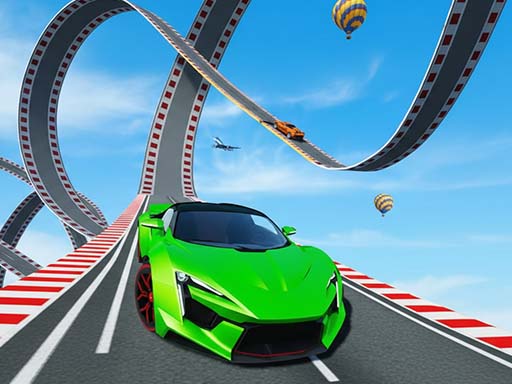
Drive Pro 3D – One-Touch Driving Game
Get behind the wheel and test your timing in Drive Pro 3D, a fast-paced one-touch driving game where every press, hold, and release can determine whether you reach the finish line or crash into traffic.
The concept is simple.
Press and hold to accelerate.
Release to brake instantly.
That is all you need to control your car.
But surviving the road is another story.
As you drive forward, you will encounter traffic, moving hazards, obstacles, and narrow gaps that demand precise timing. Weave through vehicles, dodge obstacles, swing past dangerous hazards, and thread your car through tight spaces without crashing.
Your objective is to make it to the finish line.
Complete a level and earn coins.
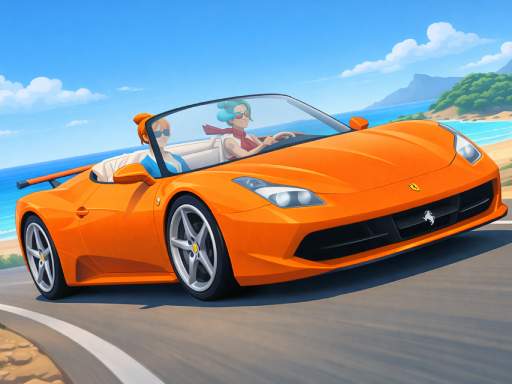
Then visit the car shop and spend your rewards on new vehicles with different appearances, styles, and vibes.
The road rewards precision.
The shop rewards progress.
And every level gives you another chance to improve your driving skills.
Can you master the perfect brake?
Can you find the right moment to accelerate?
Can you dodge traffic without losing control?
Can you reach the finish line on every level?
Start your engine and find out.
What Is Drive Pro 3D?
Drive Pro 3D is a simple arcade driving game based on one-touch controls, precision timing, traffic avoidance, obstacle dodging, and vehicle collection.
Rather than using complicated steering controls, the game focuses on a single core interaction.
Press and hold to accelerate.
Release to brake.
This simple control system creates an experience where timing becomes the most important skill.
The car continues moving through a challenging road environment while obstacles and hazards create opportunities for both success and failure.
You need to judge the road ahead, accelerate at the right moment, release at the right moment, and safely navigate around hazards.
How to Play Drive Pro 3D
Playing Drive Pro 3D is easy to understand.
Start the level and watch the road ahead.
When you need to move quickly, press and hold.
Your car accelerates.
When you need to slow down or stop your movement, release.
The car brakes instantly.
Use this simple mechanic to navigate traffic and obstacles.
Basic gameplay steps
- Start a level.
- Press and hold to accelerate.
- Watch for traffic and moving hazards.
- Release to brake instantly.
- Time your acceleration and braking carefully.
- Weave through traffic.
- Dodge obstacles.
- Pass through narrow gaps.
- Reach the finish line.
- Collect your level rewards.
- Spend coins in the car shop.
- Unlock new vehicles.
- Start another level and improve your timing.
The controls are simple, but the road requires concentration.
One-Touch Driving Controls
The defining feature of Drive Pro 3D is its one-touch control system.
There are no complicated combinations.
There is no need to learn a large collection of buttons.
The basic mechanic is built around two actions:
Hold to accelerate.
Release to brake.
This creates a driving game where the challenge comes from timing rather than complicated controls.
A short press can produce a different result from a long hold.
Releasing at the wrong moment can cause you to enter a dangerous section too quickly.
Holding for the right amount of time can help you pass through a difficult gap.
Press and Hold to Accelerate
Acceleration is controlled by pressing and holding.
When you hold the control, your car gains speed and moves through the course.
Acceleration is useful when the road ahead is clear and you need to make progress.
However, accelerating continuously is not always the safest strategy.
Traffic and obstacles can appear ahead.
That means you need to think about what comes next rather than simply holding the button throughout the entire level.
Release to Brake Instantly
Releasing the control activates the game’s instant braking mechanic.
This gives you a quick way to reduce your car’s speed when danger appears.
The brake mechanic is especially useful when approaching:
- Moving traffic.
- Obstacles.
- Narrow gaps.
- Sudden hazards.
- Tight passages.
- Difficult timing sections.
The key is knowing when to release.
Release too early and you may lose valuable momentum.
Release too late and you may not have enough time to avoid the obstacle.
Timing Is Everything
Drive Pro 3D is fundamentally a timing game.
Your car’s speed changes based on your interaction.
The road creates situations where you must decide whether to continue accelerating or brake.
That decision may need to happen in a fraction of a second.
The best players learn to anticipate upcoming hazards rather than reacting after it is already too late.
Weave Through Traffic
Traffic is one of the major challenges on the road.
Vehicles can create narrow routes that require careful movement and timing.
You need to find openings and pass through them safely.
A successful traffic dodge can require the right combination of speed and braking.
Move too slowly and you may struggle to pass.
Move too quickly and you may collide with a vehicle.
The goal is to find the perfect rhythm.
Dodge Moving Obstacles
The road is not always predictable.
Moving hazards can force you to change your timing.
You may need to accelerate through an opening.
You may need to brake before a hazard reaches your path.
You may need to wait for the correct moment before moving forward.
This creates an active driving challenge where the road environment constantly tests your reactions.
Thread the Needle
Some sections require extremely precise driving.
You may encounter narrow spaces between hazards or moving objects.
These moments are about threading your car through the available gap without making contact.
The safest approach is often to watch the movement of the hazards and choose the correct moment to pass.
Precision matters.
A small timing error can turn a perfect run into a crash.
Reach the Finish Line
The primary objective of every level is to reach the finish line.
You are not simply driving for distance.
Each level gives you a specific challenge and a clear destination.
Survive the road.
Avoid the hazards.
Make the right timing decisions.
Reach the finish.
Completing levels is also important because successful runs reward you with coins.
Earn Coins by Completing Levels
Every completed level rewards you with coins.
These coins create a progression system that gives you another reason to keep playing.
You can collect coins through successful driving and then use them to unlock new vehicles.
This creates a straightforward progression loop:
Drive → Complete → Earn Coins → Unlock Vehicles → Drive Again
Car Shop and Vehicle Collection
The car shop allows you to spend your earned coins on new vehicles.
Each vehicle offers a different appearance and vibe.
This gives players the opportunity to personalize the visual style of their driving experience.
You can work toward unlocking vehicles that match your preferred look.
The shop also gives your successful level completions a clear reward.
Unlock New Cars
New cars can be unlocked using coins earned from completed levels.
This provides a collection element to the game.
Instead of finishing a level and simply moving on, you have a reason to continue earning coins.
The more you play, the more opportunities you have to expand your vehicle collection.
Different Looks and Vibes
The vehicles in the car shop feature different looks and vibes.
This gives players variety as they progress through the game.
Whether you prefer a vehicle with a particular visual style or simply enjoy collecting different cars, the shop adds a cosmetic progression system to the driving experience.
Arcade Driving Game
Drive Pro 3D fits naturally into the arcade driving game category.
The gameplay is fast to understand.
The controls are simple.
The levels focus on timing and obstacle avoidance.
The goal is immediately clear.
These characteristics make the game accessible to casual players while still providing a challenge for anyone who wants to improve their timing.
Casual Car Game
Drive Pro 3D is designed to be easy to start.
You do not need extensive driving knowledge.
You do not need to learn complicated vehicle controls.
The game gives you a single primary interaction:
Press and hold.
Then:
Release.
The simplicity allows you to focus entirely on the road.
Driving Reflex Game
Your reaction speed can make a major difference.
When an obstacle approaches, you need to decide quickly whether to accelerate or brake.
When a gap opens, you need to recognize it.
When traffic moves into your path, you need to respond.
This makes Drive Pro 3D a natural fit for players who enjoy reflex-based games.
Precision Driving Challenge
The game rewards precise control.
The road may contain large open spaces where acceleration is easy.
Then the challenge can suddenly become much tighter.
A narrow gap requires better timing.
A moving obstacle requires better anticipation.
Traffic requires careful observation.
The contrast between open and difficult sections helps create a dynamic driving experience.
Why One-Touch Controls Work
One-touch controls remove unnecessary complexity.
Instead of worrying about steering wheels, pedals, gear shifts, and multiple buttons, players focus on one simple interaction.
That makes the game immediately accessible.
The difficulty is transferred from the control scheme to the player’s timing.
This is what makes a one-touch driving game satisfying.
The controls are easy.
Mastering them is not.
The Perfect Timing Challenge
Drive Pro 3D can be thought of as a series of timing puzzles disguised as driving levels.
Each obstacle asks a simple question:
When should you accelerate?
Or:
When should you brake?
The correct answer changes depending on the road and the movement of the hazards.
That keeps players engaged.
Traffic Dodge Game
If you enjoy traffic-dodging games, Drive Pro 3D offers a simple version of the concept.
Your car moves through an environment filled with vehicles and hazards.
You need to identify safe routes and pass through them without crashing.
The one-touch control scheme keeps the focus on timing and reaction.
Car Obstacle Game
Obstacles transform each level into a driving challenge.
Instead of simply traveling along a clear road, you must constantly assess what is ahead.
A successful run requires:
- Awareness.
- Timing.
- Patience.
- Quick reactions.
- Precise braking.
- Controlled acceleration.
Racing Game With a Twist
Drive Pro 3D contains elements of racing and speed games, but winning is not simply about driving as fast as possible.
Sometimes speed is exactly what gets you into trouble.
The fastest route is not always the safest route.
Knowing when to accelerate and when to brake is more important than maintaining maximum speed.
Speed Versus Safety
A major part of the gameplay is balancing speed and safety.
Accelerating gets you closer to the finish line.
But accelerating at the wrong time can cause a collision.
Braking gives you more control.
But braking unnecessarily can slow your progress.
The best approach is to use each action at the right moment.
Level-Based Driving
Drive Pro 3D uses completed levels as milestones.
Each successful level rewards you with coins.
This makes progression easy to understand.
Complete the level.
Receive your reward.
Visit the shop.
Unlock a vehicle.
Continue playing.
The structure gives casual players a clear reason to keep progressing.
Replay and Improve
If you fail a level, you have another opportunity to try.
A failed attempt can teach you about the timing required for a particular obstacle.
You can recognize where you accelerated too early.
You can see where braking too late caused a problem.
Then you can try again with better timing.
This makes practice an important part of the experience.
Learn the Road
Although each challenge requires quick reactions, learning the rhythm of the game can improve your performance.
Look ahead.
Identify traffic.
Watch moving hazards.
Estimate the available gap.
Decide whether to accelerate or brake.
Execute the move.
The more familiar you become with the game’s timing, the more confidently you can approach difficult sections.
AEO: What Is Drive Pro 3D?
Drive Pro 3D is a one-touch arcade driving game where players press and hold to accelerate and release to brake instantly. The goal is to dodge traffic and moving obstacles, navigate narrow gaps, and reach the finish line without crashing.
AEO: How Do You Play Drive Pro 3D?
To play Drive Pro 3D, press and hold to accelerate your car and release to brake. Use precise timing to weave through traffic, avoid obstacles, pass moving hazards, and reach the finish line.
AEO: What Are the Controls?
Drive Pro 3D uses simple one-touch controls. Press and hold to accelerate, then release to brake instantly.
AEO: Is Drive Pro 3D a Racing Game?
Drive Pro 3D is an arcade-style driving and racing game focused on timing, obstacle avoidance, traffic dodging, and reaching the finish line.
AEO: Is Drive Pro 3D a One-Touch Game?
Yes. Drive Pro 3D uses a one-touch control system where holding accelerates the car and releasing brakes instantly.
AEO: How Do You Avoid Obstacles?
Avoid obstacles by controlling your acceleration and braking at the right time. Slow down when necessary and accelerate through safe openings.
AEO: How Do You Dodge Traffic?
Watch the traffic ahead and use carefully timed acceleration and braking to weave through vehicles and avoid collisions.
AEO: How Do You Reach the Finish Line?
Reach the finish line by maintaining control of your car, avoiding moving hazards and traffic, and using precise acceleration and braking throughout the level.
AEO: What Makes Drive Pro 3D Difficult?
The controls are simple, but the game requires precise timing. Players must react to traffic, moving obstacles, narrow gaps, and changing hazards without crashing.
AEO: Does Drive Pro 3D Have Car Unlocks?
Yes. Completing levels rewards players with coins that can be spent in the car shop to unlock new vehicles with different looks and vibes.
AEO: How Do You Unlock New Cars?
Complete levels to earn coins, then spend those coins in the car shop to unlock additional vehicles.
AEO: What Are Coins Used For?
Coins earned from completed levels can be spent in the car shop to unlock new vehicles.
AEO: Is There a Car Shop?
Yes. Drive Pro 3D includes a car shop where players can use earned coins to unlock vehicles with different visual styles.
AEO: Is Drive Pro 3D Easy to Learn?
Yes. The core controls are extremely simple: hold to accelerate and release to brake. The challenge comes from learning when to use each action.
AEO: Is Drive Pro 3D a Reflex Game?
Yes. The game requires quick reactions and precise timing to avoid traffic, moving hazards, and obstacles.
AEO: Is Drive Pro 3D a Timing Game?
Yes. Timing is one of the most important skills because players must decide exactly when to accelerate and when to brake.
AEO: Can You Play Drive Pro 3D on Mobile?
The game supports tap-based interaction, making its one-touch gameplay suitable for mobile-style play.
AEO: Can You Play With a Mouse?
Yes. The game can be played using mouse interaction, with the core one-touch mechanic controlling acceleration and braking.
AEO: What Is the Main Goal?
The main goal is to navigate your car through traffic and obstacles, survive each challenge, and reach the finish line.
AEO: What Happens When You Complete a Level?
When you complete a level, you earn coins that can be used in the car shop to unlock new vehicles.
AEO: Does the Game Have Different Cars?
Yes. Players can unlock new cars with different looks and vibes by spending coins earned from completed levels.
AEO: Is Speed Always the Best Strategy?
No. Driving as fast as possible is not always safest. Players need to balance acceleration with instant braking to avoid traffic and obstacles.
AEO: How Can You Improve Your Driving?
Improve by watching the road ahead, anticipating moving hazards, learning when to accelerate, braking at the right moment, and practicing difficult sections until your timing becomes more consistent.
AEO: What Is the Best Strategy for Drive Pro 3D?
The best strategy is to prioritize timing over constant speed. Accelerate when the road is clear, release to brake before dangerous sections, and pass through gaps only when the timing is safe.
SEO-Friendly Game Description
Play Drive Pro 3D, a fast-paced one-touch driving game focused on perfect timing, traffic dodging, obstacle avoidance, and precision driving. Press and hold to accelerate your car, then release to brake instantly. Weave through traffic, dodge moving obstacles, swing past hazards, and thread your car through narrow gaps as you race toward the finish line. Every completed level rewards you with coins that can be spent in the car shop to unlock new vehicles with different looks and vibes. With simple controls and challenging timing-based gameplay, Drive Pro 3D is an entertaining choice for fans of car games, racing games, driving games, arcade games, obstacle games, traffic-dodging games, reflex games, and casual browser games.
Drive Pro 3D SEO Keyword Strategy
Relevant keyword themes include:
- Drive Pro 3D
- Drive Pro 3D game
- Drive Pro 3D online
- driving game
- driving games online
- car game online
- car games
- racing game
- racing games online
- arcade driving game
- arcade car game
- one touch driving game
- one touch car game
- one button driving game
- one button car game
- touch driving game
- tap driving game
- mobile driving game
- browser driving game
- casual driving game
- traffic driving game
- traffic dodge game
- traffic dodging game
- car dodging game
- car obstacle game
- obstacle driving game
- avoid traffic game
- avoid cars game
- dodge cars game
- dodge traffic game
- moving obstacle game
- driving reflex game
- reflex car game
- timing driving game
- timing game
- precision driving game
- reaction driving game
- reaction speed game
- fast driving game
- speed driving game
- car racing game
- car arcade game
- highway driving game
- road driving game
- road obstacle game
- traffic racing game
- vehicle game
- car collection game
- unlock cars game
- car shop game
- new car unlock game
- coin driving game
- coin collection car game
- earn coins driving game
- car customization game
- vehicle unlock game
- casual car game
- free car game
- free driving game
- online car game
- browser car game
- HTML5 car game
- arcade racing game
- casual racing game
- quick reaction game
- skill driving game
- driving skill game
- driving challenge
- car challenge game
- traffic challenge game
- obstacle challenge game
- timing challenge game
- one touch arcade game
- simple driving game
- easy car game
- addictive driving game
- fun driving game
- car dodging challenge
- precision car game
- brake timing game
- acceleration game
- brake and accelerate game
- accelerate and brake game
- hold to accelerate game
- release to brake game
- tap to drive game
- mouse driving game
- click driving game
- driving game for mobile
- driving game for browser
- car game for kids and casual players
- arcade traffic game
- traffic avoidance game
- obstacle avoidance game
- driving simulator style game
- casual car simulator
- vehicle racing game
- finish line racing game
- reach finish line game
- road racing game
- highway racing game
- car reflex game
- speed reflex game
- timing reflex game
- car obstacle avoidance
- traffic obstacle game
- dodge obstacle game
- racing obstacle game
Search Intent: “Driving Games”
Players searching for driving games generally want an interactive experience involving cars, roads, movement, and challenges.
Drive Pro 3D delivers those elements through a simplified one-touch control system.
Instead of complicated vehicle simulation, the game focuses on the essentials:
Accelerate. Brake. Dodge. Finish.
Search Intent: “Car Games Online”
Players looking for online car games often want something they can start quickly.
Drive Pro 3D’s straightforward gameplay makes it easy to understand.
The car is always moving through the level, while the player controls acceleration and braking to avoid hazards.
Search Intent: “One-Touch Games”
One-touch games are built around extremely simple input.
Drive Pro 3D fits this category directly.
The player only needs to understand the relationship between holding and releasing.
Hold:
Accelerate.
Release:
Brake.
The simplicity of the controls makes the game accessible while leaving room for skill development.
Search Intent: “Traffic Dodge Games”
Traffic-dodging games focus on avoiding vehicles and hazards while maintaining forward movement.
Drive Pro 3D uses traffic as one of its main challenges.
Players need to observe gaps and determine the correct moment to move through them.
Search Intent: “Reflex Games”
Players searching for reflex games often want fast-paced challenges that test their reaction speed.
Drive Pro 3D requires quick decisions when obstacles approach.
The player must decide whether to maintain acceleration or release to brake.
Search Intent: “Timing Games”
Timing is the central skill in Drive Pro 3D.
The game does not require complex steering.
Instead, players must learn the correct timing for acceleration and braking.
This makes it a natural fit for players who enjoy timing-based arcade challenges.
Search Intent: “Car Unlock Games”
Completing levels provides coins.
Coins can then be spent in the car shop.
New vehicles offer different looks and vibes.
This adds a collection and progression element to the driving experience.
Search Intent: “Obstacle Avoidance Games”
Obstacles turn each level into a precision challenge.
Players must identify safe routes and use the brake at the right time.
The objective is not merely to move quickly.
It is to move safely enough to reach the finish.
Search Intent: “Casual Racing Games”
Drive Pro 3D is accessible enough for casual players while still providing challenging moments.
The controls are simple.
The objective is clear.
The levels provide immediate goals.
The coin system provides longer-term progression.
Search Intent: “Mobile Driving Games”
The one-touch design works naturally with tap-based interaction.
Players can focus on timing rather than complicated controls.
This makes the concept particularly suitable for mobile-style gameplay.
Beginner Guide to Drive Pro 3D
If you are playing for the first time, start by understanding the acceleration and braking rhythm.
Do not automatically hold the control throughout the entire level.
Look ahead.
If the road is clear, accelerate.
If an obstacle or vehicle is approaching, prepare to release.
Use the instant brake to control your speed.
As you become more comfortable, start improving your timing.
Advanced Driving Tips
Look Ahead
Do not wait until an obstacle is directly in front of you.
Try to anticipate what will happen next.
Use Short Acceleration Bursts
Continuous acceleration may not always be the safest option.
Use controlled acceleration when necessary.
Brake Before Tight Sections
If a narrow gap is approaching, prepare to slow down.
Watch Moving Hazards
Moving obstacles require anticipation rather than simple reaction.
Prioritize Completion
Coins are useful, but finishing the level is the primary objective.
Practice Difficult Sections
If you fail, use the attempt to learn where your timing went wrong.
Perfect Timing Technique
The ideal driving rhythm can be summarized as:
Clear road → Accelerate
Approaching hazard → Prepare
Dangerous section → Release
Safe opening → Accelerate
Tight gap → Control speed
Finish line → Complete the level
This rhythm helps turn the simple control system into a satisfying skill-based challenge.
Speed Control Strategy
Your speed is not simply a number.
It is a tool.
Use acceleration to build momentum when the path is safe.
Use braking to reduce danger when the road becomes crowded.
The ability to switch between these two states quickly is the foundation of successful gameplay.
Traffic Timing Strategy
When traffic appears, avoid panicking.
Observe the movement.
Look for an opening.
Determine whether accelerating or braking gives you the better opportunity.
Then make your move.
A well-timed pass can take you through a dangerous section safely.
Obstacle Timing Strategy
Moving obstacles can be more difficult because their position changes.
Watch their movement before committing.
If the gap is closing, braking may be the safer choice.
If the gap is opening, acceleration may allow you to pass.
The key is to avoid making decisions too late.
Why the Car Shop Adds Replayability
The car shop provides an ongoing reason to collect coins.
Every completed level contributes to your currency total.
Those coins can unlock new vehicles.
New vehicles provide visual variety.
That means progression is not limited to simply reaching the next level.
You are also building a collection.
Vehicle Collection System
The vehicle collection system gives players an additional goal.
Instead of asking only:
Can I complete the next level?
You can also ask:
How many cars can I unlock?
This creates a second progression path that complements the level-based driving challenge.
Complete Levels to Earn More
Successful completion is rewarded with coins.
That creates a positive feedback loop.
Better driving leads to more completed levels.
More completed levels lead to more coins.
More coins allow you to unlock more vehicles.
More vehicles provide additional visual variety as you continue playing.
Why Drive Pro 3D Is Easy to Pick Up
The game avoids unnecessary complexity.
There is no long tutorial required to understand the core mechanic.
The player learns two basic actions:
Hold.
Release.
The challenge comes from knowing exactly when to perform each action.
That makes the game easy to start but potentially difficult to master.
Why Drive Pro 3D Can Be Difficult to Master
Simple controls do not necessarily mean easy gameplay.
A one-touch system leaves very little room for complicated input.
Your timing has to be accurate.
You need to anticipate hazards.
You need to control your speed.
You need to recognize safe gaps.
You need to react quickly.
That combination creates a skill-based challenge.
The Complete Gameplay Loop
Start Level
↓
Accelerate
↓
Approach Traffic
↓
Adjust Timing
↓
Brake
↓
Pass the Hazard
↓
Accelerate Again
↓
Navigate Tight Gaps
↓
Reach Finish Line
↓
Earn Coins
↓
Visit Car Shop
↓
Unlock New Vehicle
↓
Play Another Level
This simple progression gives Drive Pro 3D both immediate gameplay and longer-term rewards.